
Assessment types and requirements
Assessments help your teachers evaluate your understanding of a unit’s learning outcomes. The assessment types and requirements vary between units.
Find your assessment requirements
Your Unit Description provides information about each assessment, including:
- The assessment name and description.
- Key requirements, such as word count, due date and weighting.
- The related learning outcomes.
Check the assessment instructions and any rubric in your unit site for the requirements of each task.
Types of assessment
Depending on your unit, you may be asked to complete some of the following:
Written assignments
- Essays and book reviews.
- Reports, including reports on an organisation visit or research.
- Case studies and reflective journals.
Online and group activities
- Group assignments: these may use a wiki or a group assignment activity.
- Quizzes and lessons: activities completed using the relevant tools in Tabor Online.
- Forum discussions: including question-and-answer forums.
Other or practical assessments
- Participation in live forums or class activities.
- Creative projects and offline portfolios.
- Class presentations, counselling sessions and skills demonstrations.
For explanations and resources for particular assessment formats, visit Types of Assessments in the Student Academic Tool Kit.
Grading schema
The following chart shows the grade bands and descriptions.
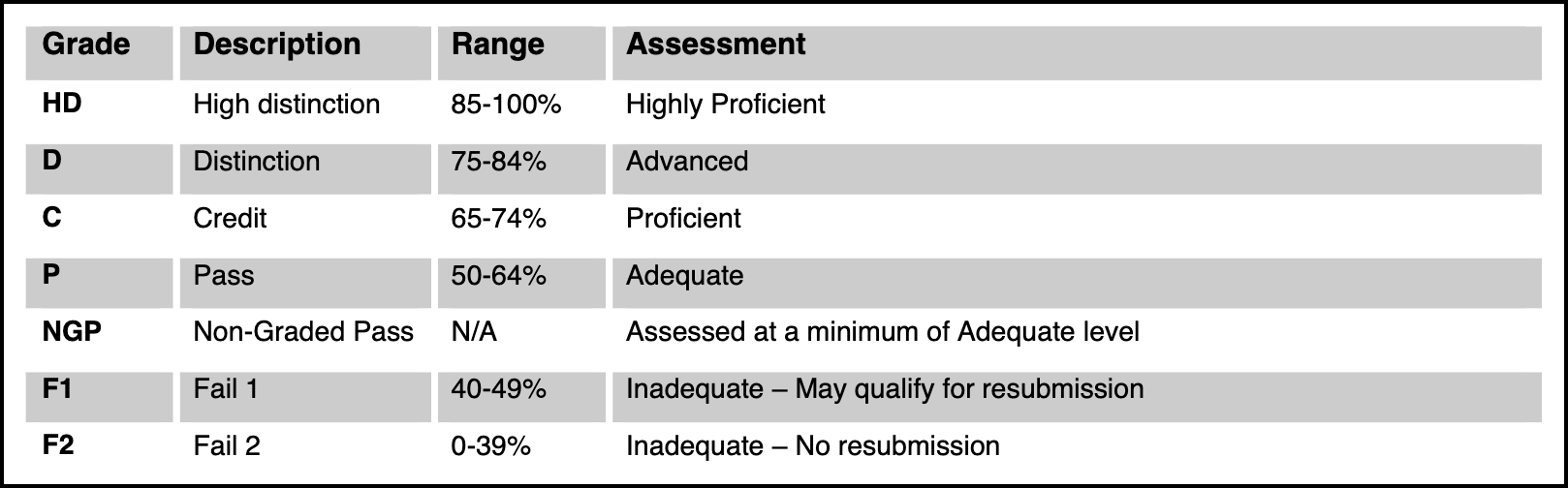
For assessment-specific criteria, check your Unit Description and the instructions or rubric provided for the task.
Academic support
For guidance on understanding and preparing assessments, visit Assessment Tips in the Student Academic Tool Kit.